qwertylabs
QK / LESSONS · REFERENCE

Component field guide.

A growing maker's toolbox: recognise the part, understand its job, know what its pins mean, then choose it because your project needs it.

Studio deck
01 · how to use this guide

Learn the part before the project

You do not need to memorise every component. You need to know what question to ask when you pick one up.

1 · recogniseWhat is it?
2 · directionInput or output?
3 · connectionWhat do the pins/legs mean?
4 · purposeWhen is it useful?
Reference deckYou can jump to the component you need. These cards explain parts; the project decks give the full wiring and code steps.
02 · breadboard

Breadboard

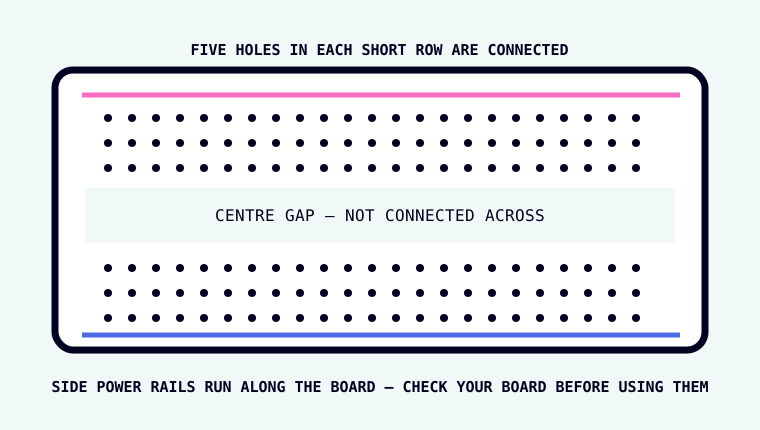
Breadboard showing internally connected groups of holes

What is it? A reusable board for building circuits without solder.

How do you recognise it? A plastic board covered in a grid of small holes, usually with a long gap down the middle.

What is connected? Short groups of holes are joined underneath. The centre gap separates the two sides. Long side rails may be connected along their length, but some boards split them.

Good for: testing circuits, changing parts quickly, learning.

03 · jumper wires

Jumper wires

What are they? Reusable wires with plug ends designed for header pins and breadboards.

Male → male

Pin on both ends. Useful breadboard-to-breadboard.

Female → male

Socket on one end, pin on the other. Useful GPIO-header-to-breadboard.

Female → female

Socket on both ends. Useful between exposed header pins.

Wire colour is a human convention, not a property of the wire. A red wire is not automatically power.
04 · LED

LED

Full name: light-emitting diode.

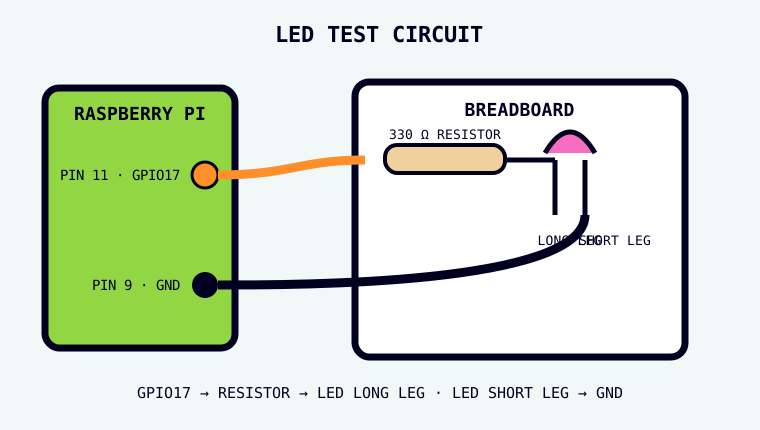
Diagram showing an LED's long and short legs in a Raspberry Pi circuit
Input or output?Output: it makes light.
Direction?Yes. Long leg = anode, short leg/flat side = cathode.
Needs?A suitable current-limiting resistor.
Useful for?Status lights, feedback, indicators, simple displays.
05 · resistor

Resistor

What is it? A component that resists current flow.

Measured inOhms, written Ω.
Direction?No. Ordinary resistors can go either way around.
How to identify value?Colour bands, printed markings, or a multimeter.
Useful for?Limiting LED current, pull-up/pull-down circuits, voltage dividers and many other jobs.
Beginner habitIf a lesson specifies 330 Ω, use 330 Ω. Do not choose a random resistor because it “looks about right”.
06 · pushbutton

Pushbutton

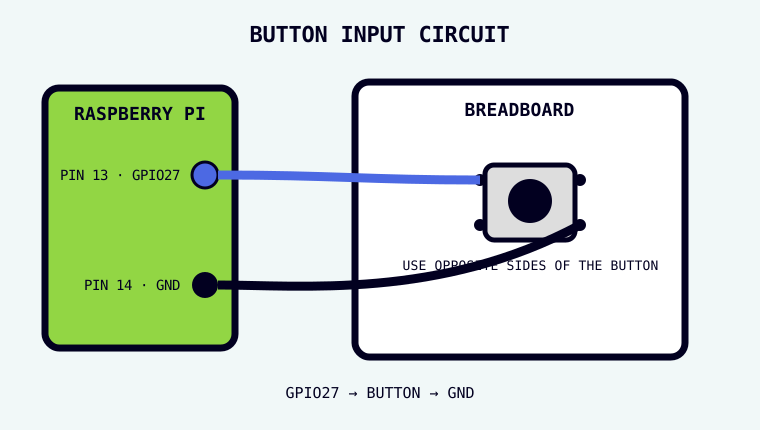
Four-legged tactile pushbutton shown in a GPIO input circuit

What is it? A momentary switch: it changes the electrical connection only while it is pressed.

Input or output? Input.

Four legs? On a common tactile button, the two legs on one side are already joined internally. Pressing the button connects that side to the opposite side.

Useful for: start buttons, choices, triggers, simple controls.

07 · PIR

PIR motion sensor

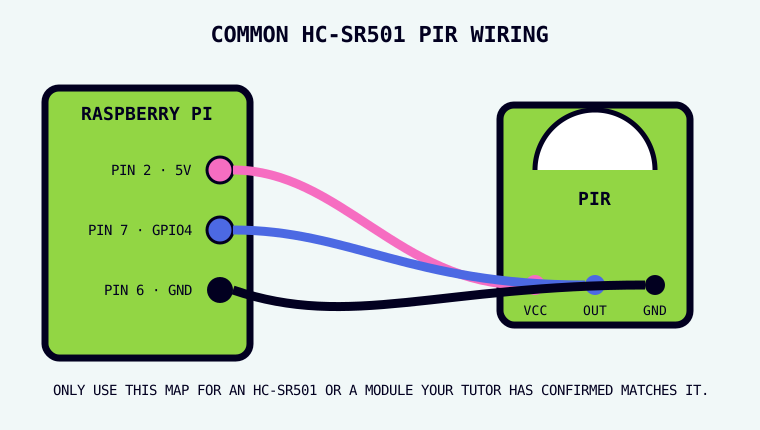
HC-SR501 PIR diagram showing VCC, OUT and GND

Full name: passive infrared sensor.

What does it notice? Changes in infrared energy. A warm body moving across its view often creates that change.

Input or output? Input.

Common labels: VCC = power, OUT = signal to the Pi, GND = ground.

Useful for: automatic lights, occupancy detection, wildlife cameras, Lucky Cam.

A PIR detects movement, not identity. “Something warm moved” is not the same as “Lucky moved”. Also: pin order and supply voltage can vary by module, so read the label on the exact board.
08 · camera

Raspberry Pi camera module

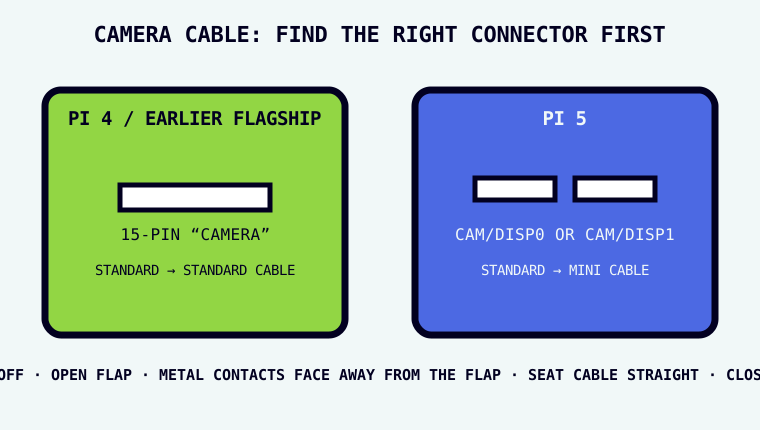
Diagram comparing camera connectors on Raspberry Pi 4 and Raspberry Pi 5

What is it? A camera sensor and lens that sends image data to the Pi through a flat ribbon cable.

Input or output? Input: it captures light and turns it into image data.

Connection? Camera ribbon connector, not the GPIO header.

Important: Pi 4 and earlier flagship boards use the standard 15-pin connector; Pi 5 uses a smaller 22-pin connector and needs the appropriate cable.
Useful for: photos, video, timelapse, machine vision, Cat Cam.

09 · buzzer

Buzzer

What is it? A component that converts an electrical signal into sound.

Input or output?Output.
Two common typesActive buzzers make a tone when powered. Passive buzzers need a changing signal to create tones.
Check firstLook for polarity markings and the part's voltage/current requirements.
Useful forAlerts, timers, confirmation sounds, games.
10 · servo

Servo motor

What is it? A motor with position control. Instead of simply spinning, a hobby servo can move its arm to a requested angle.

Input or output?Output.
Typical wiresPower, ground and signal. Colours vary by manufacturer.
ImportantA servo can draw far more current than a GPIO pin can provide. Never power a motor directly from a GPIO pin.
Useful forPointing, opening, tilting, moving a small mechanism.
11 · ultrasonic

Ultrasonic distance sensor

What is it? A sensor that sends a burst of sound above human hearing and measures how long the echo takes to return.

Input or output?Both: the Pi triggers a pulse, then reads the echo.
Typical labelsVCC, TRIG, ECHO, GND.
ImportantCommon HC-SR04 modules produce a 5 V ECHO signal. Raspberry Pi GPIO inputs are 3.3 V, so a safe level-shifting circuit is required.
Useful forDistance sensing without touching the object.
12 · potentiometer

Potentiometer

What is it? An adjustable resistor, usually controlled by a knob or slider.

Analogue? Analogue means the value can change across many levels, not just ON/OFF.

Input or output?Usually used as an analogue input.
Three connectionsTwo ends of a resistive track plus a moving middle connection called the wiper.
ImportantA standard Raspberry Pi has no built-in analogue input. To read a potentiometer directly, add an analogue-to-digital converter (ADC).
Useful forPhysical dials for speed, brightness, volume or any adjustable value.
13 · choosing

Choose by job, not by tutorial

I need to knowWas something pressed?

Button

I need to knowDid something move?

PIR

I need to makeSomething visible

LED

I need to makeA photo

Camera

That is the point of the field guide: the project creates a need; the component is a tool chosen to meet it.